 SpaceScope
See what is filling your disk
SpaceScope scans a drive or folder and draws every file as a rectangle sized by the space it takes. The biggest things are the biggest shapes.
Free. No sign-up, no installer on Windows. On an older PC, get the 32-bit Windows version.
to read a 712 GB system drive holding 1.3 million files, straight from the NTFS file table.
Stays current
Delete, download or build something and the map redraws itself. No rescan.
Filter as you type
*.mp4; >100mb
Windows 10 and 11
One exe. Nothing to install.
Debian and Ubuntu
X11 and Wayland.
Free and open source
Apache 2.0 licence, written in Rust.
Every version
What you get
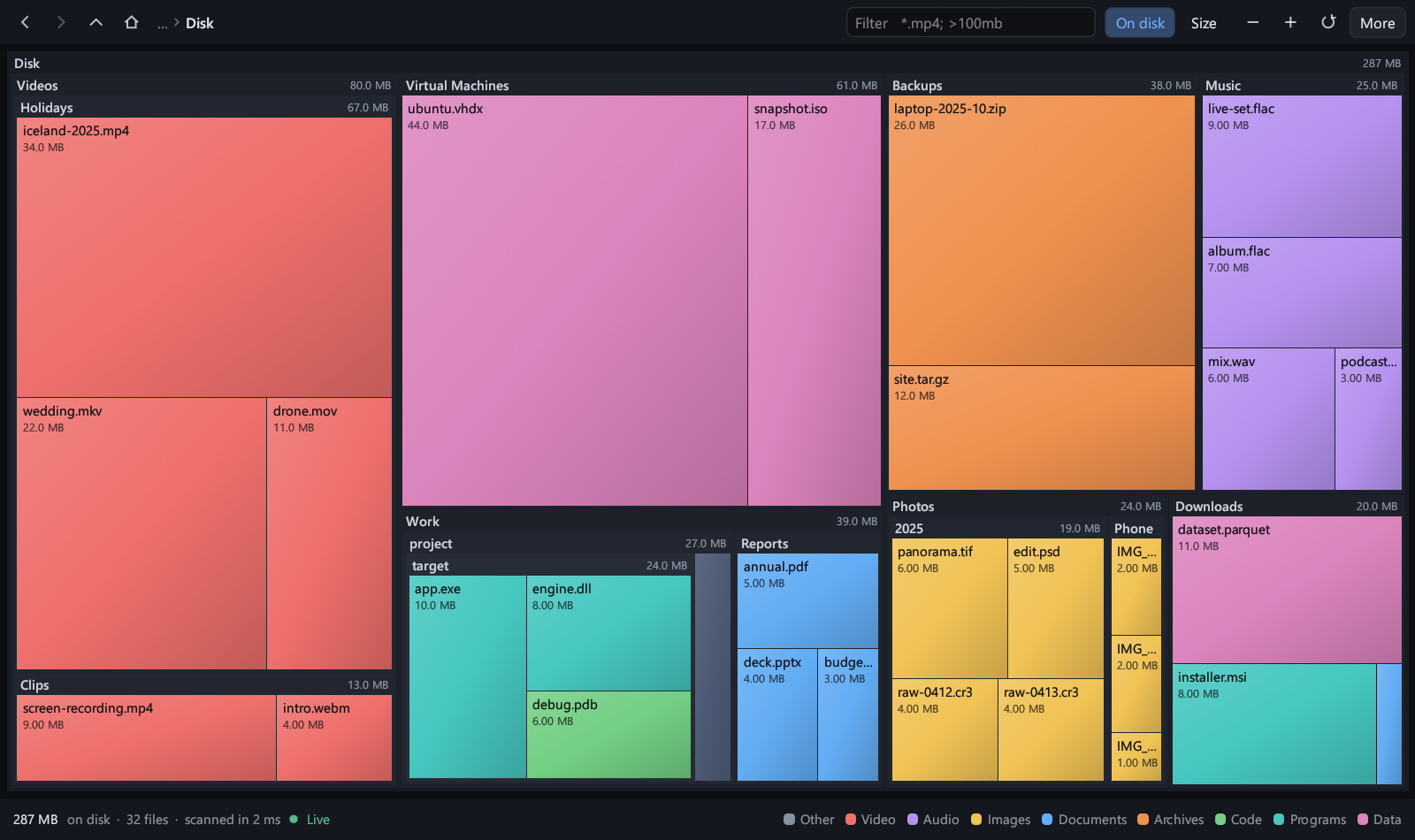
Colour is the kind of file. Double-click a folder to zoom in, right-click for open, show in file manager, copy path and move to trash.
How it works, and why that is faster
Exploring a disk as a live treemap was made popular on Windows by SpaceSniffer from Uderzo Software, and that idea is the starting point here. SpaceScope shares no code with it and is built differently underneath. Most disk analyzers walk the disk folder by folder; this is what SpaceScope does instead.
| SpaceScope | Walking folder by folder | |
|---|---|---|
| Reading a drive | As administrator, one straight read of the NTFS master file table, the index Windows itself keeps of every file. 1.3 million files in 2.4 s. | Open each folder and ask for its content, hundreds of thousands of times. Time grows with the number of folders. |
| Without admin rights | One system call returns names and sizes for a whole folder, spread over a pool of threads. | Often a separate call for every file. |
| First scan after a reboot | The file table is one continuous read, so it costs the same every time. | Every folder is its own trip to the disk; a cold scan can take many times longer. |
| Protected folders | The file-table scan sees every file. Nothing is left out as unreadable. | Skipped unless each one can be opened. |
| Hard links | Counted once. | Usually counted once per link, which inflates folders such as WinSxS. |
| Size on disk | Compressed, sparse and cloud-only files appear at the space they really occupy. | Often the nominal size only. |
| Keeping up with changes | Only the folders that changed are re-read and merged in place. Everything else stays where it was. | Rescan the folder tree, or all of it. |
| Drawing | The whole map is one batch on the graphics card. Layout and filtering run on background threads, so the window never waits. | Commonly drawn rectangle by rectangle on the same thread as the window. |
| Memory | 48 bytes per file plus its name: about 260 MB for a 1.3-million-file drive. | Varies, often a full object per file. |
| Where it runs | Windows 10 and 11, Debian, Ubuntu. | Typically Windows only. |
| Source code | Open, under the Apache 2.0 licence. | Varies. |
The right-hand column describes the usual approach, not a measurement of any one product: SpaceScope has not been raced against other tools. Two things others offer that SpaceScope does not yet: colour tags on files, and customisable export templates.
Measured, not promised
| Scan | Files and folders | Time |
|---|---|---|
| Whole C: drive, as administrator | 1,311,000 | 2.4 s |
| Whole C: drive, standard user | 1,350,000 | 8 to 10 s |
| Home folder, Windows | 585,000 | 1.4 to 1.9 s |
| Home folder, Ubuntu | 491,000 | 2.3 s |
One machine: 16 logical cores, NVMe SSD, Windows 11 with Defender on, Ubuntu under WSL2, files already in the system cache. The first scan after a reboot is slower for a standard user (49 s for the whole drive). Totals were checked against PowerShell and du and match to the byte.
Install
Windows
Unzip and run spacescope.exe. Almost every PC wants the 64-bit download; the 32-bit one is for 32-bit Windows. To use the fast drive scan, choose More, then Restart as administrator.
spacescope.exe C:\Users\me
Debian and Ubuntu
Ubuntu 22.04 or newer, Debian 12 or newer.
sudo apt install ./spacescope-amd64.deb
spacescope
Code signing
SpaceScope uses the SignPath Foundation for code signing of its Windows programs. Free code signing is provided by SignPath.io, with a certificate by the SignPath Foundation.
What gets signed
Only files built by the public GitHub Actions workflow from a tagged commit of this repository. Nothing built on a personal computer is ever signed. Versions up to 1.2.0 were published before signing was set up and are unsigned.
Who decides
Committers, reviewers and approvers: the repository owner, SkippyNet. Every change reaches the main branch through a pull request that must pass the build on all platforms.
Your privacy
This program will not transfer any information to other networked systems unless specifically requested by the user or the person installing or operating it. See the privacy policy.
Releases
Every version, newest first, with what changed and its downloads.